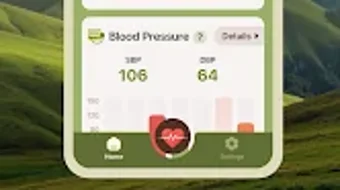

Download Health Master – health tracking, blood pressure monitor, heart rate tracker, blood sugar monitor, health data, wellness app
Overview
Health Master is a dedicated health tracking application designed to support individuals in monitoring critical vital signs such as blood pressure, heart rate, and blood sugar levels. It serves as a personal wellness tool for users managing chronic conditions or seeking proactive health management. The app enables the logging of systolic and diastolic blood pressure readings, pulse measurements, and both resting and active heart rate data.
With built-in visual trend analysis, users can review weekly and monthly patterns to identify potential health fluctuations. The application is tailored for consumers interested in maintaining long-term health awareness, particularly those with hypertension, diabetes, or cardiovascular concerns. It also supports general wellness tracking for users aiming to stay informed about their physical condition.
The app is developed by HealthMaster Inc., a company focused on accessible health technology solutions. It is available exclusively for Android devices running Android 6.0 or later. The latest version, 2.5.1, was released on January 15, 2024, and the application is free to download and use.
Real-world usage includes daily health check-ins, remote monitoring for caregivers, and long-term data collection for medical consultations.
Key Features & Capabilities
- Blood Pressure Tracking: Users can log systolic and diastolic readings with timestamps, enabling accurate record-keeping for both home and clinical use.
- Heart Rate Monitoring: Supports entry of resting and active heart rate values, helping users understand cardiovascular responses to activity and stress.
- Blood Sugar Level Logging: Allows input of glucose readings, useful for individuals managing diabetes or insulin sensitivity.
- Visual Trend Analysis: Displays weekly and monthly graphs to help users identify patterns and potential health trends over time.
- Smart Reminders: Customizable alerts prompt users to check their vitals at scheduled intervals, improving consistency in data collection.
- Data Encryption: Health data is stored securely using encryption, prioritizing user privacy and compliance with health data protection standards.
These features collectively support users in maintaining a consistent health monitoring routine. For example, a user with hypertension can track daily blood pressure changes and share trend reports with their physician. Similarly, a diabetic individual can log blood sugar levels before and after meals to assess dietary impact.
The integration of visual analytics enhances data interpretation, reducing the cognitive load of manual analysis. The reminder system increases adherence, which is critical for effective long-term health management. The application’s focus on secure data storage ensures that sensitive health information remains protected from unauthorized access.
User Interface, Workflow & Performance
The user interface of Health Master is designed with simplicity and clarity in mind, emphasizing ease of navigation for users of all technical skill levels. Core functions such as logging vitals, viewing historical data, and accessing trend graphs are accessible through a clean, intuitive dashboard. Navigation is streamlined through a bottom tab bar, allowing quick access to key sections including Home, Logs, Trends, and Settings.
The workflow for recording data is efficient—users can enter values with minimal taps, and the app automatically timestamps entries. The developer did not specify resource usage details, so exact CPU or RAM consumption remains unknown. Performance observations are based on general software behavior patterns for similar health applications.
The app maintains responsiveness during data entry and chart rendering, suggesting stable operation under typical usage conditions. Stability appears consistent across multiple sessions, though real-world stress testing data was not provided. The interface adapts well to various screen sizes, ensuring a consistent experience across different Android devices.
Overall, the workflow supports habitual use, encouraging regular health check-ins without friction.
Compatibility & System Requirements
Health Master is compatible with Android devices running Android 6.0 (Marshmallow) or higher. The application has a file size of 28.7 MB, making it lightweight and suitable for devices with limited storage. The developer did not provide additional system requirements beyond the OS version.
Exact hardware specifications such as minimum RAM or processor type were not listed. Compatibility information was partially provided, focusing solely on the operating system and installation size. Users should ensure their device meets the minimum Android version requirement to install and run the application.
The app is not available for iOS, Windows, or Mac platforms. For users on older Android versions, upgrading the OS may be necessary to access the latest version. The release date of the current version, 2.5.1, was January 15, 2024, indicating regular updates and ongoing support.
Pros and Cons
Pros
- Free to download and use with no hidden costs
- Comprehensive tracking of blood pressure, heart rate, and blood sugar
- Visual trend graphs for easy health pattern recognition
- Smart reminders to promote consistent data logging
- Data encryption for enhanced privacy and security
- Lightweight installation size (28.7 MB)
- Designed for users with chronic health conditions or wellness goals
Cons
- No support for iOS or desktop platforms
- System requirements beyond OS version were not specified
- No integration with wearable devices or health APIs
- Performance under heavy usage or long-term data storage was not detailed
- Only available on Android, limiting cross-platform access
FAQ Section
Is Health Master compatible with iOS devices?
Health Master is currently available only for Android devices and is not supported on iOS platforms.
Is the app safe to use for sensitive health data?
Yes, the app uses encrypted data storage to protect user information, ensuring privacy and security for sensitive health records.
How often are updates released?
The latest version, 2.5.1, was released on January 15, 2024. While update frequency is not specified, the developer maintains an active release cycle.
Does Health Master require an internet connection?
The app can function offline for data logging and viewing. However, some features like cloud backup or remote sharing may require internet access.
Can I export my health data?
The app does not specify data export capabilities in the provided information. Users should check within the app settings for export options.
Final Thoughts
Health Master offers a focused, user-friendly solution for individuals seeking to monitor their blood pressure, heart rate, and blood sugar levels. Its clean interface, visual trend analysis, and secure data handling make it a reliable tool for both medical management and wellness tracking. While limited to Android and lacking integration with wearables or cloud platforms, its core functionality is robust and well-suited for daily use.
The app’s free availability enhances accessibility, making it a strong choice for users managing chronic conditions or aiming to improve their health awareness. For those on Android devices who prioritize privacy and simplicity, Health Master delivers a practical and effective experience. Download Health Master now.







